AGPL-3.0-or-later · core * · sink · linux_amd64, linux_arm64, darwin_amd64, darwin_arm64, windows_amd64 · 14617.1 KB · Nov 19, 2026
Failure Detector v0.3.24 — AI spaghetti detection for Prusa Connect Local
Warning: this project was 100% written by Mistral Vibe. I have tried to direct it and test as best I can, but consider this potential AI slop and take your precautions. I did it because it was fun, but it should not be shared without this disclaimer. However, it works on my machine!
Expect bugs. Beta, written by an AI, tested on exactly one setup (Prusa Core One + standalone Buddy3D camera over RTSP + Connect Local on a Linux server). Read the code before trusting it with a print.
Supports two different AI models
obico (default) — the AGPL-3.0 reference detector (~200 MB, 416x416, bounding boxes)
printguard — ~5 MB ShuffleNetV2 encoder + prototype classifier (GPL-2.0, oliverbravery/PrintGuard), very fast on CPU, 224x224 tiled scoring
Switch from the Spaghetti tab on a printer's page (Model dropdown) or the extension's global settings — one option, last writer wins.
What it does
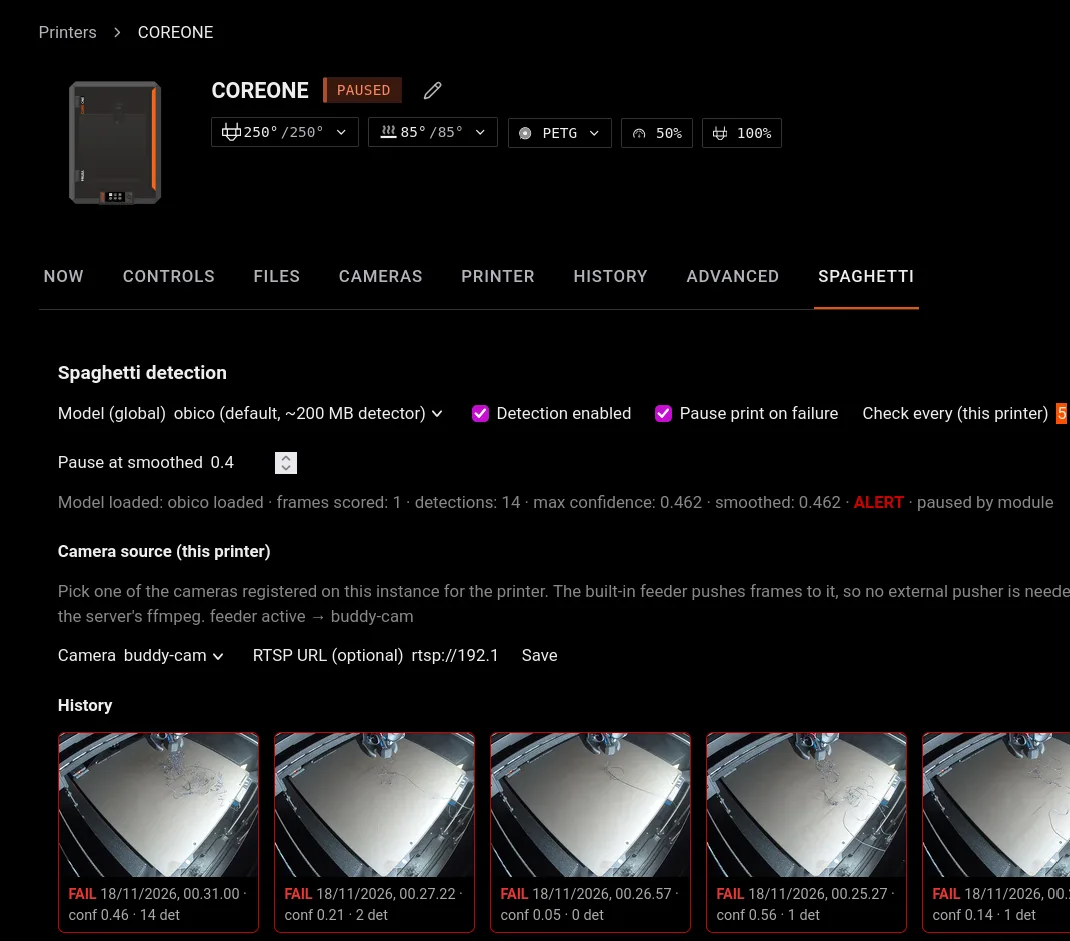
Spaghetti tab on every printer page: enable/disable, pause-on-failure, alert/pause thresholds, check interval, model picker, camera picker (dropdown of cameras registered on your instance), history of the last 10 scored frames with photos
Built-in per-printer camera feeder; RTSP-only cameras pulled with the server's ffmpeg (optional RTSP URL field)
Publishes failure alerts on the event stream; can pause the print when the smoothed score crosses the pause threshold
Requirement: ffmpeg on the server
RTSP cameras (e.g. a standalone Buddy3D) are pulled by running ffmpeg installed on the Connect Local server — the extension has no bundled binary and makes no other external calls. Install it with your package manager (apt install ffmpeg / dnf install ffmpeg / …). Only rtsp:// and rtsps:// URLs are accepted, and ffmpeg runs with -protocol_whitelist rtsp,rtp,tcp,udp,tls. Cameras that are already registered on your instance (like the printer's own camera) need no ffmpeg at all — frames are read from the printer's camera channel. HTTP snapshot cameras work without ffmpeg too, but only to hosts you list in the camera_snapshot_hosts option.
Configuration notes: some settings are known to overwrite each other
Model: one global option. The global settings page has a switch (
use_printguard, ON = printguard, OFF = obico); the Spaghetti tab has a dropdown. Both write the same option — last writer wins, and changing it on one page clears the other's choice. (A leftovermodel:key in an old config block still applies while the switch is off.)Check interval: the global
min_interval_secondsis only the default; the per-printer "Check every (this printer)" on the Spaghetti tab supersedes it when set. Note the effective frame rate can never be faster than the camera's ownsnapshot_everycadence (camera settings), because that is how often the host hands frames to the extension at all.Threshold/pause/enable changes from the Spaghetti tab are stored as runtime overrides in the module's data dir and win over the global options until the global value is changed again.
Granting the pause permission
The extension cannot grant itself operate on a printer — an administrator does it once per printer:
Create an API credential in the web UI: sign in to Connect Local at
https://<server>:8080, click your user avatar (top right) → API tokens → create a token (looks likepcl_…, shown once — copy it).Find the printer id:
GET /api/v1/deviceswith that token, or from the printer page URL.Grant the module the operator relation on the printer:
201 = granted. Without it the Spaghetti tab shows a red banner and the module alerts but cannot pause.
Licenses
Extension: AGPL-3.0-or-later
Obico weights: AGPL-3.0 (TheSpaghettiDetective/obico-server)
PrintGuard weights: GPL-2.0 (oliverbravery/PrintGuard) — downloaded once at first use, sha256-verified, URLs overridable
Review fixes (carried from 0.3.15, still in force)
Addressing the review of 0.3.14:
Caller checks on writes.
POST /settingsrequires the caller (fromroutesapi.PrincipalOf) tooperatethe printer named in the body (oroperate_resourceon the module kind for direct API calls),POST /feedersandPOST /printer-settingsrequireoperateon the printer — checked withaccessapi, denied on any error. Read-only users can no longer switch detection or pausing.No secrets leave the module.
GET /feedersreturns the camera source withtoken_set(whether a token is stored) instead of the token itself.ffmpeg is hardened. RTSP grabs accept only
rtsp:///rtsps://URLs and run with-protocol_whitelist rtsp,rtp,tcp,udp,tls, sofile:,http:,concat:etc. are refused before exec. The ffmpeg requirement is stated in the listing summary and the install/update dialog's egress section.Camera snapshot fetches are declared and bounded. New option
camera_snapshot_hosts(comma-separated hosts) with a matching egress entry;snapshot_urlmust be http(s) with a host on that list, the body is capped (io.LimitReaderatmax_frame_bytes) and the call has a timeout.
Smaller: the UI camera list goes through host.client (no direct fetch to the host API), and model downloads have a 5-minute timeout.
Note on the scanner hits: camerapush.go os/exec is the ffmpeg RTSP grab described above; ops.go "Concat" is the ONNX Concat operator implementation in the pure-Go inference engine, not a downloader.
Changes since 0.3.15
0.3.20: fixed a crash (panic in the ONNX conv) when switching models with a stale cached weights file; input sizes are now validated and per-frame panics are recovered
0.3.22: switching the model from the Spaghetti tab now re-resolves the model URL/sha, so the correct weights are downloaded (sha256-verified) instead of reusing the previous model's file
0.3.21/0.3.23: the model picker on the global settings page is a switch (
use_printguard), no more free-text field0.3.24: every scored frame is logged with the model's inference time (
frame scored … took=…), visible in the server journal
Sign in to comment.
No comments yet.